
Microsoft Upgrading Your Skills to MCSA: Windows Server 2016 (070-743日本語版) - 070-743日本語 Exam Practice Test
あなたはNano1という名前のNano Serverを持っています。DNSサーバーの役割がNano1にインストールされているかどうかを識別するために使用するコマンドレットはどれですか?
Correct Answer: B
Explanation: Only visible for TrainingDump members. You can sign-up / login (it's free).
ネットワークにcontoso.comという名前のActive Directoryフォレストが含まれています。 フォレストには、contoso.comとlitwareinc.comの2つのドメインがあります。
あなたの会社は最近、DA_Computersという名前のグループのメンバに対してDirectAccessを展開しました。 すべてのクライアントコンピュータはDA_Computersのメンバーです。
DirectAccessクライアントは、contoso.comドメイン内のリソースにのみアクセスできます。 クライアントは、ネットワークへのL2TP VPN接続を使用してlitwareinc.comドメイン内のリソースにアクセスできます。
DirectAccessクライアントがlitwareinc.comドメイン内のリソースにアクセスできるようにする必要があります。
あなたは何をするべきか?
あなたの会社は最近、DA_Computersという名前のグループのメンバに対してDirectAccessを展開しました。 すべてのクライアントコンピュータはDA_Computersのメンバーです。
DirectAccessクライアントは、contoso.comドメイン内のリソースにのみアクセスできます。 クライアントは、ネットワークへのL2TP VPN接続を使用してlitwareinc.comドメイン内のリソースにアクセスできます。
DirectAccessクライアントがlitwareinc.comドメイン内のリソースにアクセスできるようにする必要があります。
あなたは何をするべきか?
Correct Answer: B
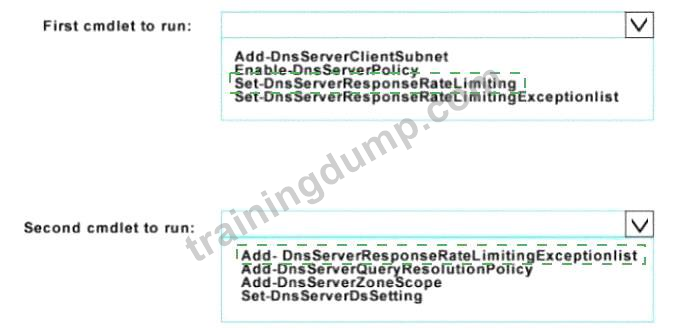
ネットワークにcontoso comという名前のActive Directoryドメインが含まれています。 ドメインにはServer1という名前のDNSサーバーが含まれています。Server1で応答率の制限を有効にします。
応答速度制限が10.0.0.0/24のネットワーク上にあるホストに適用されないようにする必要があります。
どのコマンドレットを実行する必要がありますか? 答えるには、回答エリアで適切なオプションを選択します

応答速度制限が10.0.0.0/24のネットワーク上にあるホストに適用されないようにする必要があります。
どのコマンドレットを実行する必要がありますか? 答えるには、回答エリアで適切なオプションを選択します
Correct Answer:
Explanation
Set-DnsServerResponseRateLimiting
Add-DnsServerResponseRateLimitingExceptionlist
https://docs.microsoft.com/en-us/powershell/module/dnsserver/set-dnsserverresponseratelimiting?view=win10-p
Windows Server 2016を実行するServer1という名前のHyper-Vホストがあります。Server1には、VM1とVM2という2つの仮想マシンがあります。
VM1とVM2がネットワーク経由でServer1と通信できることがわかります。
あなたは、VM1とVM2は相互に通信できるだけようにする必要があります。 ソリューションは、VM1とVM2がServer1と通信するのを防止する必要があります。
どのコマンドレットを使用しますか?
VM1とVM2がネットワーク経由でServer1と通信できることがわかります。
あなたは、VM1とVM2は相互に通信できるだけようにする必要があります。 ソリューションは、VM1とVM2がServer1と通信するのを防止する必要があります。
どのコマンドレットを使用しますか?
Correct Answer: A
Explanation: Only visible for TrainingDump members. You can sign-up / login (it's free).
注:この質問は、同じシナリオを提示する一連の質問の一部です。 シリーズの各質問には、上記の目標を達成できる独自の解決策が含まれています。 いくつかの質問セットには1つ以上の正しい解決策があるかもしれないが、他の質問セットには正しい解決策がないかもしれない。
このセクションで質問に答えると、それに戻ることはできません。 その結果、これらの質問はレビュー画面に表示されません。
ネットワークにcontoso.comという名前のActive Directoryドメインが含まれている
仮想化ホストとして使用されるNano1という名前のNano Serverイメージを作成する必要があります。 Windows(登録商標)サーバ2016のソースファイルは、ドライブDに配置されている。
解決策:次のコマンドレットを実行します。
New-NanoServerImage -Edition Datacenter -DeploymentType Host -Package Mictosoft-
NanoServer-SCVMM-Package -MediaPath 'D:\ -TargetPath C:\nano1\Nano1.wim
-ComputerName Nano1 -Domaintiame Contoso.com
これは目標を満たしていますか?
このセクションで質問に答えると、それに戻ることはできません。 その結果、これらの質問はレビュー画面に表示されません。
ネットワークにcontoso.comという名前のActive Directoryドメインが含まれている
仮想化ホストとして使用されるNano1という名前のNano Serverイメージを作成する必要があります。 Windows(登録商標)サーバ2016のソースファイルは、ドライブDに配置されている。
解決策:次のコマンドレットを実行します。
New-NanoServerImage -Edition Datacenter -DeploymentType Host -Package Mictosoft-
NanoServer-SCVMM-Package -MediaPath 'D:\ -TargetPath C:\nano1\Nano1.wim
-ComputerName Nano1 -Domaintiame Contoso.com
これは目標を満たしていますか?
Correct Answer: B
Windows Server 2016を実行するServer1という名前のサーバーがあります.DockerデーモンはServer1上で動作します。
Docker管理者という名前のセキュリティグループのメンバーがDockerを管理できることを確認する必要があります。
あなたは何をするべきか?
Docker管理者という名前のセキュリティグループのメンバーがDockerを管理できることを確認する必要があります。
あなたは何をするべきか?
Correct Answer: C
Explanation: Only visible for TrainingDump members. You can sign-up / login (it's free).
注:この質問は、同じシナリオを提示する一連の質問の一部です。 シリーズの各質問には、独自の解決策が含まれています。 ソリューションが目標を達成しているかどうかを判断する。
ネットワークにcontoso.comという名前のActive Directoryドメインが含まれています。 ドメインには、Server1という名前のDNSサーバーが含まれています。 すべてのクライアントコンピュータはWindows 10を実行します。
Server1には、次のゾーン構成があります。

あなたは、ドメイン内のすべてのクライアントコンピュータがfabrikam.com名前空間のDNSSEC検証を行うことを確認する必要があります。
ソリューション:Server1でのWindows PowerShellから、追加-DnsServertrustAnchorコマンドレットを実行します。
これは目標を満たしていますか?
ネットワークにcontoso.comという名前のActive Directoryドメインが含まれています。 ドメインには、Server1という名前のDNSサーバーが含まれています。 すべてのクライアントコンピュータはWindows 10を実行します。
Server1には、次のゾーン構成があります。
あなたは、ドメイン内のすべてのクライアントコンピュータがfabrikam.com名前空間のDNSSEC検証を行うことを確認する必要があります。
ソリューション:Server1でのWindows PowerShellから、追加-DnsServertrustAnchorコマンドレットを実行します。
これは目標を満たしていますか?
Correct Answer: A
Explanation: Only visible for TrainingDump members. You can sign-up / login (it's free).
ネットワークにはActive Directoryドメインが含まれています。 ドメインには2つのHyper-Vホストが含まれています。
ホスト間でライブマイグレーションを実行する予定です。
Kerberosを使用して、ライブ移行トラフィックが確実に認証されるようにする必要があります。
あなたはまず何をすべきですか?
ホスト間でライブマイグレーションを実行する予定です。
Kerberosを使用して、ライブ移行トラフィックが確実に認証されるようにする必要があります。
あなたはまず何をすべきですか?
Correct Answer: A
Explanation: Only visible for TrainingDump members. You can sign-up / login (it's free).
ネットワークにcontoso.comという名前のActive Directoryドメインが含まれています。 ドメインには、Windows Server 2016を実行するServer1という名前のサーバーが含まれています。
Server1にIPアドレス管理(IPAM)をインストールします。
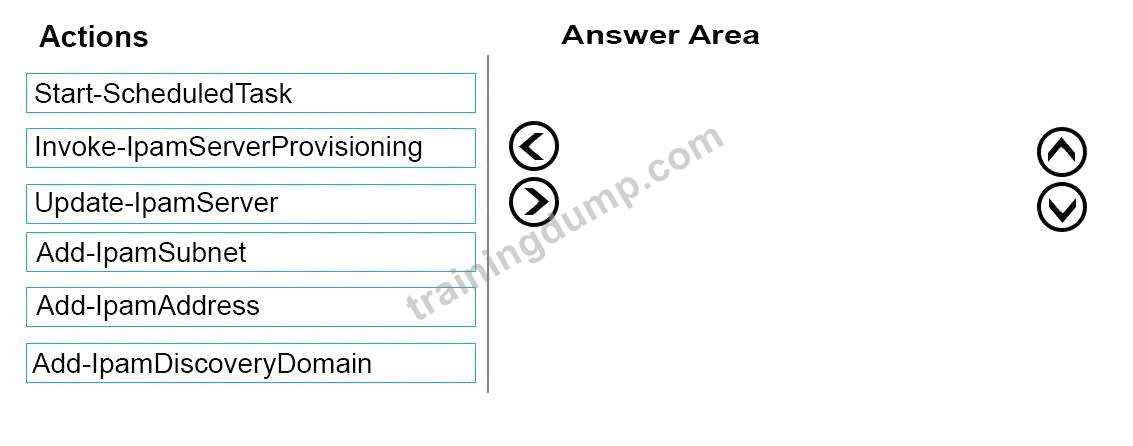
IPAMがcontoso.comで管理できるサーバーの検出を手動で開始する必要があります。
どの3つのコマンドレットを順番に実行する必要がありますか? 応答するには、適切なコマンドレットをコマンドレットの一覧からアンサーエリアに移動し、正しい順序で並べ替えます。
Server1にIPアドレス管理(IPAM)をインストールします。
IPAMがcontoso.comで管理できるサーバーの検出を手動で開始する必要があります。
どの3つのコマンドレットを順番に実行する必要がありますか? 応答するには、適切なコマンドレットをコマンドレットの一覧からアンサーエリアに移動し、正しい順序で並べ替えます。
Correct Answer:

Explanation

Step 1: Invoke-IpamServerProvisioning
Choose a provisioning method
The Invoke-IpamGpoProvisioning cmdlet creates and links three group policies specified in the Domain parameter for provisioningrequired access settingson the server roles managed by the computer running the IP Address Management (IPAM) server.
Step 2: Add-IpamDiscoveryDomain
Configure the scope of discovery
The Add-IpamDiscoveryDomain cmdlet adds an Active Directory discovery domain for an IP AddressManagement (IPAM) server. A discovery domain is a domain that IPAM searches to find infrastructure servers. An IPAM server uses the list of discovery domains to determine what type of servers to add. By default, IPAM discovers all domain controllers, Dynamic Host Configuration Protocol (DHCP) servers, and Domain Name System (DNS) servers.
Step 3: Start-ScheduledTask
Start server discovery
To begin discovering servers on the network, click Start server discovery to launch the IPAM ServerDiscovery task or use the Start-ScheduledTask command.