
Blue Prism Certified Associate Developer - ASDEV01 Exam Practice Test
Blue Prism Processes can be built across multiple workspaces - broken up into individual tasks, that each sit on their own Pages What name is given to this?
Correct Answer: A
Explanation: Only visible for TrainingDump members. You can sign-up / login (it's free).
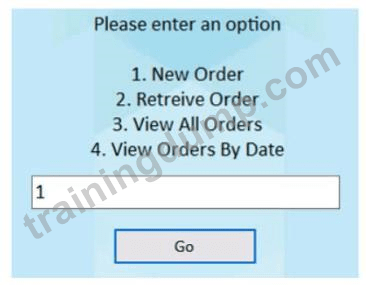
When working with the orders area of the Centrix Data Solutions order system, there is a requirement to enter an order menu option in the field located above the Go button:
The menu option field element in Application Modeller has been configured as follows:
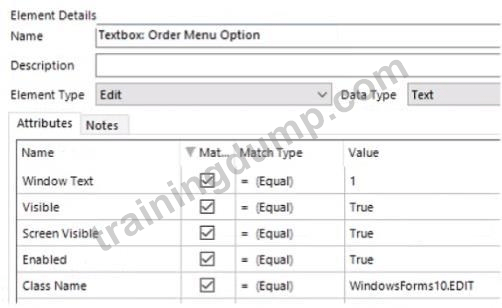
Which Attribute should be un-ticked to ensure the menu option field element can be consistently recognised?
The menu option field element in Application Modeller has been configured as follows:
Which Attribute should be un-ticked to ensure the menu option field element can be consistently recognised?
Correct Answer: A
Explanation: Only visible for TrainingDump members. You can sign-up / login (it's free).
Which of the following items are valid Blue Prism Data Item data types?
Correct Answer: A,D,E,F
Examine the following Blue Prism Process diagram:
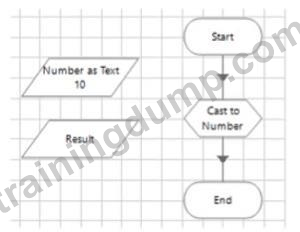
The 'Number as Text' data item is configured as text data item: and has an initial value of 10 The 'Result' data item is configured as a number data item.
The 'Cast to Number' Calculation stage must output the text value stored in the 'Number as Text1 data item, to the Result data item Which of the following expressions would you use in the 'Cast to Number1 Calculation stage to set the value of the 'Result' data item?
The 'Number as Text' data item is configured as text data item: and has an initial value of 10 The 'Result' data item is configured as a number data item.
The 'Cast to Number' Calculation stage must output the text value stored in the 'Number as Text1 data item, to the Result data item Which of the following expressions would you use in the 'Cast to Number1 Calculation stage to set the value of the 'Result' data item?
Correct Answer: A
Explanation: Only visible for TrainingDump members. You can sign-up / login (it's free).
Examine the following Process flow:
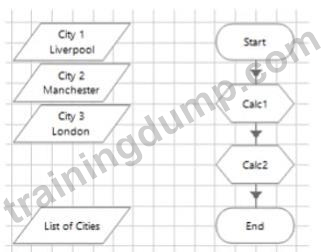
The data item 'City V is configured as a Text data item and has an initial value of 'LiverpooI'.
The data item 'City 2' is configured as a Text data item and has an initial value of 'Manchester'.
The data item 'City 3* is configured as a Text data item and has an initial value of 'London'.
The data item 'List of Cities' is configured as a Text data item and has no initial value.
The 'Calc 1' stage is configured as follows:

What will the value of the list of Cities' data item be after the Process flow has run?
The data item 'City V is configured as a Text data item and has an initial value of 'LiverpooI'.
The data item 'City 2' is configured as a Text data item and has an initial value of 'Manchester'.
The data item 'City 3* is configured as a Text data item and has an initial value of 'London'.
The data item 'List of Cities' is configured as a Text data item and has no initial value.
The 'Calc 1' stage is configured as follows:
What will the value of the list of Cities' data item be after the Process flow has run?
Correct Answer: B
Explanation: Only visible for TrainingDump members. You can sign-up / login (it's free).
Examine the following recover flow taken from a Blue Prism Process:
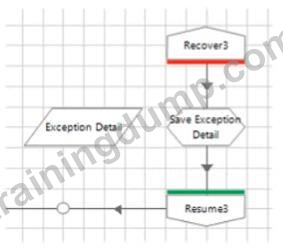
The 'Exception Detail' data item has no initial value and has a data type of text The Calculation stage "Save Exception Detail' will output the current exception detail to the 'Exception Detail' data item What expression would you use in the 'Save Exception Detail' stage to achieve this?
The 'Exception Detail' data item has no initial value and has a data type of text The Calculation stage "Save Exception Detail' will output the current exception detail to the 'Exception Detail' data item What expression would you use in the 'Save Exception Detail' stage to achieve this?
Correct Answer:
CurrentException.Detail
This is the correct expression to use in the calculation stage to output the current exception detail to the data item. It uses the built-in object CurrentException and its property Detail to get the value of the exception detail. References:
https://portal.blueprism.com/sites/default/files/2021-05/Blue%20Prism%20Certification%20-%20Associate%20D (page 15)
This is the correct expression to use in the calculation stage to output the current exception detail to the data item. It uses the built-in object CurrentException and its property Detail to get the value of the exception detail. References:
https://portal.blueprism.com/sites/default/files/2021-05/Blue%20Prism%20Certification%20-%20Associate%20D (page 15)