
IT Specialist HTML5 Application Development - INF-306 Exam Practice Test
The ctx variable is the context of an HTML5 canvas object. What does the following HTML markup draw?
ctx.arc(x, y, r, 0, Math.PI, true);
ctx.arc(x, y, r, 0, Math.PI, true);
Correct Answer: D
Explanation: Only visible for TrainingDump members. You can sign-up / login (it's free).
You are creating a form that requires the category to be entered as a two- or three-letter abbreviation. The input is mandatory.
You need to configure the input validation for the form.
Complete the markup by typing into the boxes.
Note: You will receive partial credit for each correct answer.

You need to configure the input validation for the form.
Complete the markup by typing into the boxes.
Note: You will receive partial credit for each correct answer.
Correct Answer:
minlength , maxlength , required
Explanation:
First box: minlength
Second box: maxlength
Third box: required
The correct validation attributes are minlength, maxlength, and required. The input must accept a category abbreviation that is either two or three characters long. The minlength= " 2 " attribute enforces the lower boundary by preventing submission when the entered text contains fewer than two characters. The maxlength= " 3 " attribute enforces the upper boundary by preventing the user from entering more than three characters into the field. Since the question states that the input is mandatory, the required attribute must also be included. required is a Boolean validation attribute, so it does not need a value; its presence alone makes the field required before the form can be submitted. Together, these attributes configure basic HTML5 constraint validation directly in markup without requiring JavaScript. The completed input therefore requires a value, rejects values shorter than two characters, and limits the value to no more than three characters.
References/topics: HTML5 form validation, minlength, maxlength, required, text input constraints, mandatory form fields.
Explanation:
First box: minlength
Second box: maxlength
Third box: required
The correct validation attributes are minlength, maxlength, and required. The input must accept a category abbreviation that is either two or three characters long. The minlength= " 2 " attribute enforces the lower boundary by preventing submission when the entered text contains fewer than two characters. The maxlength= " 3 " attribute enforces the upper boundary by preventing the user from entering more than three characters into the field. Since the question states that the input is mandatory, the required attribute must also be included. required is a Boolean validation attribute, so it does not need a value; its presence alone makes the field required before the form can be submitted. Together, these attributes configure basic HTML5 constraint validation directly in markup without requiring JavaScript. The completed input therefore requires a value, rejects values shorter than two characters, and limits the value to no more than three characters.
References/topics: HTML5 form validation, minlength, maxlength, required, text input constraints, mandatory form fields.
Which two background graphics will automatically adjust to different screen sizes? Choose 2.
Note: You will receive partial credit for each correct selection.
Note: You will receive partial credit for each correct selection.
Correct Answer: B,D
Explanation: Only visible for TrainingDump members. You can sign-up / login (it's free).
Which code segment correctly displays images with 80% transparency and a blue 8px shadow?
Correct Answer: A
Explanation: Only visible for TrainingDump members. You can sign-up / login (it's free).
The logo shown is displayed on a web page as an SVG.
Note: The coordinate values are labeled for reference.
Evaluate the image on the left and complete the markup by selecting the correct option from each drop-down list.
Note: You will receive partial credit for each correct selection.
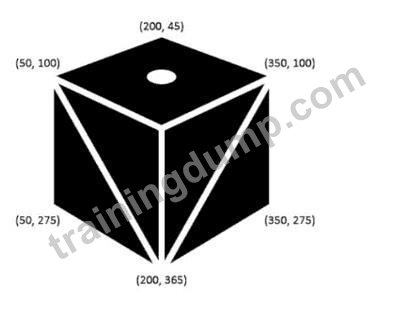

Note: The coordinate values are labeled for reference.
Evaluate the image on the left and complete the markup by selecting the correct option from each drop-down list.
Note: You will receive partial credit for each correct selection.
Correct Answer:

Explanation:

The SVG image is built from three filled polygon faces, one white ellipse, and two white diagonal line segments. The three < polygon > elements define the black cube faces by connecting multiple coordinate points. The small white oval on the top face must be an < ellipse > because the markup uses cx, cy, rx, and ry; these attributes define an ellipse center point and horizontal/vertical radii. The diagonal marks on the left and right faces are straight segments, so they must use the SVG < line > element. A line is defined with starting coordinates x1, y1 and ending coordinates x2, y2. The first diagonal runs from the bottom point (200,365) to the upper-left point (50,100). The second diagonal must mirror it on the right side, so it starts at (200,365) and ends at (350,100). Therefore, the final coordinate selection is x2= " 350 " y2= " 100 " . References/topics:
SVG shapes, < polygon > , < ellipse > , < line > , coordinate-based vector drawing, SVG markup construction.
You have created custom error messages for a form. When a user attempts to submit the form with invalid data, the data must remain in the form and error messages must be displayed. Which Event property or method should you use?
Correct Answer: D
Explanation: Only visible for TrainingDump members. You can sign-up / login (it's free).
Which CSS property defines the sides of an element where other floating elements are not allowed?
Correct Answer: B
Explanation: Only visible for TrainingDump members. You can sign-up / login (it's free).