

Share Latest Apr-2026 DP-203 DUMP with 365 Questions and Answers
PDF Dumps 2026 Exam Questions with Practice Test
Microsoft DP-203 exam covers a wide range of topics that are essential for data engineers working on the Azure platform. DP-203 exam focuses on topics such as designing and implementing data storage solutions using Azure Blob Storage, Azure Cosmos DB, and Azure SQL Database. DP-203 exam also covers topics such as data processing using Azure Data Factory, Azure Databricks, and Azure Stream Analytics. Additionally, the exam tests the candidate's knowledge of Azure Data Lake Storage and Azure Synapse Analytics for implementing big data solutions.
To pass the DP-203 certification exam, candidates need to have a deep understanding of data engineering principles, concepts, and tools. They should also have hands-on experience working with Azure services for data engineering, as well as knowledge of data modeling, data warehousing, and data visualization. Data Engineering on Microsoft Azure certification is ideal for data engineers who want to demonstrate their expertise in building and managing data solutions on Microsoft Azure, as well as for those who are looking to advance their careers in the field of data engineering.
Microsoft DP-203 certification exam is designed for data engineers, data architects, and individuals who are responsible for designing and implementing data solutions on Azure. DP-203 exam measures the candidate's ability to design and implement data storage solutions, data processing solutions, and data security solutions using Azure services. Data Engineering on Microsoft Azure certification is an excellent way to demonstrate your expertise in Azure data engineering and can help you advance your career as a data engineer.
NEW QUESTION # 150
You have an Azure subscription that contains the following resources:
* An Azure Active Directory (Azure AD) tenant that contains a security group named Group1
* An Azure Synapse Analytics SQL pool named Pool1
You need to control the access of Group1 to specific columns and rows in a table in Pool1.
Which Transact-SQL commands should you use? To answer, select the appropriate options in the answer area.
Answer:
Explanation:
Explanation:
Box 1: GRANT
You can implement column-level security with the GRANT T-SQL statement.
Box 2: CREATE SECURITY POLICY
Implement Row Level Security by using the CREATE SECURITY POLICY Transact-SQL statement Reference:
https://docs.microsoft.com/en-us/azure/synapse-analytics/sql-data-warehouse/column-level-security
NEW QUESTION # 151
You have an Azure subscription that contains the following resources:
An Azure Active Directory (Azure AD) tenant that contains a security group named Group1 An Azure Synapse Analytics SQL pool named Pool1 You need to control the access of Group1 to specific columns and rows in a table in Pool1.
Which Transact-SQL commands should you use? To answer, select the appropriate options in the answer area.
Answer:
Explanation:
Reference:
https://docs.microsoft.com/en-us/azure/synapse-analytics/sql-data-warehouse/column-level-security
NEW QUESTION # 152
You plan to ingest streaming social media data by using Azure Stream Analytics. The data will be stored in files in Azure Data Lake Storage, and then consumed by using Azure Datiabricks and PolyBase in Azure Synapse Analytics.
You need to recommend a Stream Analytics data output format to ensure that the queries from Databricks and PolyBase against the files encounter the fewest possible errors. The solution must ensure that the tiles can be queried quickly and that the data type information is retained.
What should you recommend?
- A. CSV
- B. Parquet
- C. Avro
- D. JSON
Answer: C
Explanation:
The Avro format is great for data and message preservation. Avro schema with its support for evolution is essential for making the data robust for streaming architectures like Kafka, and with the metadata that schema provides, you can reason on the data. Having a schema provides robustness in providing meta-data about the data stored in Avro records which are self- documenting the data. References: http://cloudurable.com/blog/avro/index.html
NEW QUESTION # 153
You need to implement an Azure Databricks cluster that automatically connects to Azure Data lake Storage Gen2 by using Azure Active Directory (Azure AD) integration. How should you configure the new clutter? To answer, select the appropriate options in the answers area. NOTE: Each correct selection is worth one point.
Answer:
Explanation:
Explanation
https://docs.azuredatabricks.net/spark/latest/data-sources/azure/adls-passthrough.html
NEW QUESTION # 154
The following code segment is used to create an Azure Databricks cluster.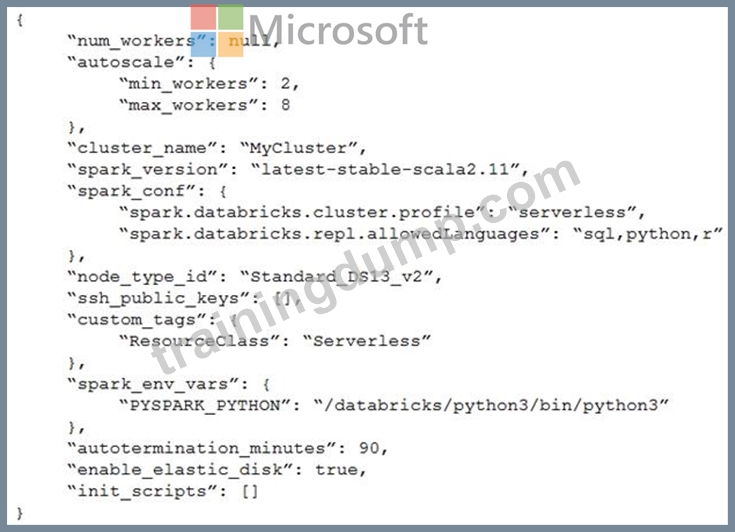
For each of the following statements, select Yes if the statement is true. Otherwise, select No.
NOTE: Each correct selection is worth one point.
Answer:
Explanation:
Explanation
Graphical user interface, text, application Description automatically generated
Box 1: Yes
A cluster mode of 'High Concurrency' is selected, unlike all the others which are 'Standard'. This results in a worker type of Standard_DS13_v2.
Box 2: No
When you run a job on a new cluster, the job is treated as a data engineering (job) workload subject to the job workload pricing. When you run a job on an existing cluster, the job is treated as a data analytics (all-purpose) workload subject to all-purpose workload pricing.
Box 3: Yes
Delta Lake on Databricks allows you to configure Delta Lake based on your workload patterns.
Reference:
https://adatis.co.uk/databricks-cluster-sizing/
https://docs.microsoft.com/en-us/azure/databricks/jobs
https://docs.databricks.com/administration-guide/capacity-planning/cmbp.html
https://docs.databricks.com/delta/index.html
NEW QUESTION # 155
You have two Azure Data Factory instances named ADFdev and ADFprod. ADFdev connects to an Azure DevOps Git repository.
You publish changes from the main branch of the Git repository to ADFdev.
You need to deploy the artifacts from ADFdev to ADFprod.
What should you do first?
- A. From ADFdev, modify the Git configuration.
- B. From ADFdev, create a linked service.
- C. From Azure DevOps, update the main branch.
- D. From Azure DevOps, create a release pipeline.
Answer: D
Explanation:
Explanation
In Azure Data Factory, continuous integration and delivery (CI/CD) means moving Data Factory pipelines from one environment (development, test, production) to another.
Note:
The following is a guide for setting up an Azure Pipelines release that automates the deployment of a data factory to multiple environments.
In Azure DevOps, open the project that's configured with your data factory.
On the left side of the page, select Pipelines, and then select Releases.
Select New pipeline, or, if you have existing pipelines, select New and then New release pipeline.
In the Stage name box, enter the name of your environment.
Select Add artifact, and then select the git repository configured with your development data factory.
Select the publish branch of the repository for the Default branch. By default, this publish branch is adf_publish.
Select the Empty job template.
Reference:
https://docs.microsoft.com/en-us/azure/data-factory/continuous-integration-deployment
Topic 1, Litware, inc.
Case study
This is a case study. Case studies are not timed separately. You can use as much exam time as you would like to complete each case. However, there may be additional case studies and sections on this exam. You must manage your time to ensure that you are able to complete all questions included on this exam in the time provided.
To answer the questions included in a case study, you will need to reference information that is provided in the case study. Case studies might contain exhibits and other resources that provide more information about the scenario that is described in the case study. Each question is independent of the other questions in this case study.
At the end of this case study, a review screen will appear. This screen allows you to review your answers and to make changes before you move to the next section of the exam. After you begin a new section, you cannot return to this section.
To start the case study
To display the first question in this case study, click the button. Use the buttons in the left pane to explore the content of the case study before you answer the questions. Clicking these buttons displays information such as business requirements, existing environment, and problem statements. If the case study has an All Information tab, note that the information displayed is identical to the information displayed on the subsequent tabs. When you are ready to answer a question, click the button to return to the question.
Overview
Litware, Inc. owns and operates 300 convenience stores across the US. The company sells a variety of packaged foods and drinks, as well as a variety of prepared foods, such as sandwiches and pizzas.
Litware has a loyalty club whereby members can get daily discounts on specific items by providing their membership number at checkout.
Litware employs business analysts who prefer to analyze data by using Microsoft Power BI, and data scientists who prefer analyzing data in Azure Databricks notebooks.
Requirements
Business Goals
Litware wants to create a new analytics environment in Azure to meet the following requirements:
See inventory levels across the stores. Data must be updated as close to real time as possible.
Execute ad hoc analytical queries on historical data to identify whether the loyalty club discounts increase sales of the discounted products.
Every four hours, notify store employees about how many prepared food items to produce based on historical demand from the sales data.
Technical Requirements
Litware identifies the following technical requirements:
Minimize the number of different Azure services needed to achieve the business goals.
Use platform as a service (PaaS) offerings whenever possible and avoid having to provision virtual machines that must be managed by Litware.
Ensure that the analytical data store is accessible only to the company's on-premises network and Azure services.
Use Azure Active Directory (Azure AD) authentication whenever possible.
Use the principle of least privilege when designing security.
Stage Inventory data in Azure Data Lake Storage Gen2 before loading the data into the analytical data store. Litware wants to remove transient data from Data Lake Storage once the data is no longer in use.
Files that have a modified date that is older than 14 days must be removed.
Limit the business analysts' access to customer contact information, such as phone numbers, because this type of data is not analytically relevant.
Ensure that you can quickly restore a copy of the analytical data store within one hour in the event of corruption or accidental deletion.
Planned Environment
Litware plans to implement the following environment:
The application development team will create an Azure event hub to receive real-time sales data, including store number, date, time, product ID, customer loyalty number, price, and discount amount, from the point of sale (POS) system and output the data to data storage in Azure.
Customer data, including name, contact information, and loyalty number, comes from Salesforce, a SaaS application, and can be imported into Azure once every eight hours. Row modified dates are not trusted in the source table.
Product data, including product ID, name, and category, comes from Salesforce and can be imported into Azure once every eight hours. Row modified dates are not trusted in the source table.
Daily inventory data comes from a Microsoft SQL server located on a private network.
Litware currently has 5 TB of historical sales data and 100 GB of customer data. The company expects approximately 100 GB of new data per month for the next year.
Litware will build a custom application named FoodPrep to provide store employees with the calculation results of how many prepared food items to produce every four hours.
Litware does not plan to implement Azure ExpressRoute or a VPN between the on-premises network and Azure.
NEW QUESTION # 156
You configure monitoring for a Microsoft Azure SQL Data Warehouse implementation. The implementation uses PolyBase to load data from comma-separated value (CSV) files stored in Azure Data Lake Gen 2 using an external table.
Files with an invalid schema cause errors to occur.
You need to monitor for an invalid schema error.
For which error should you monitor?
- A. EXTERNAL TABLE access failed due to internal error: 'Java exception raised on call to HdfsBridge_Connect: Error [Unable to instantiate LoginClass] occurred while accessing external files.'
- B. EXTERNAL TABLE access failed due to internal error: 'Java exception raised on call to HdfsBridge_Connect: Error
[com.microsoft.polybase.client.KerberosSecureLogin] occurred while accessing external files.' - C. Cannot execute the query "Remote Query" against OLE DB provider "SQLNCLI11": for linked server
"(null)", Query aborted- the maximum reject threshold (o
rows) was reached while regarding from an external source: 1 rows rejected out of total 1 rows processed. - D. EXTERNAL TABLE access failed due to internal error: 'Java exception raised on call to HdfsBridge_Connect: Error [No FileSystem for scheme: wasbs] occurred while accessing external file.'
Answer: C
Explanation:
Explanation
Customer Scenario:
SQL Server 2016 or SQL DW connected to Azure blob storage. The CREATE EXTERNAL TABLE DDL points to a directory (and not a specific file) and the directory contains files with different schemas.
SSMS Error:
Select query on the external table gives the following error:
Msg 7320, Level 16, State 110, Line 14
Cannot execute the query "Remote Query" against OLE DB provider "SQLNCLI11" for linked server
"(null)". Query aborted-- the maximum reject threshold (0 rows) was reached while reading from an external source: 1 rows rejected out of total 1 rows processed.
Possible Reason:
The reason this error happens is because each file has different schema. The PolyBase external table DDL when pointed to a directory recursively reads all the files in that directory. When a column or data type mismatch happens, this error could be seen in SSMS.
Possible Solution:
If the data for each table consists of one file, then use the filename in the LOCATION section prepended by the directory of the external files. If there are multiple files per table, put each set of files into different directories in Azure Blob Storage and then you can point LOCATION to the directory instead of a particular file. The latter suggestion is the best practices recommended by SQLCAT even if you have one file per table.
NEW QUESTION # 157
You have an Azure Data Factory pipeline shown the following exhibit.
The execution log for the first pipeline run is shown in the following exhibit.
The execution log for the second pipeline run is shown in the following exhibit.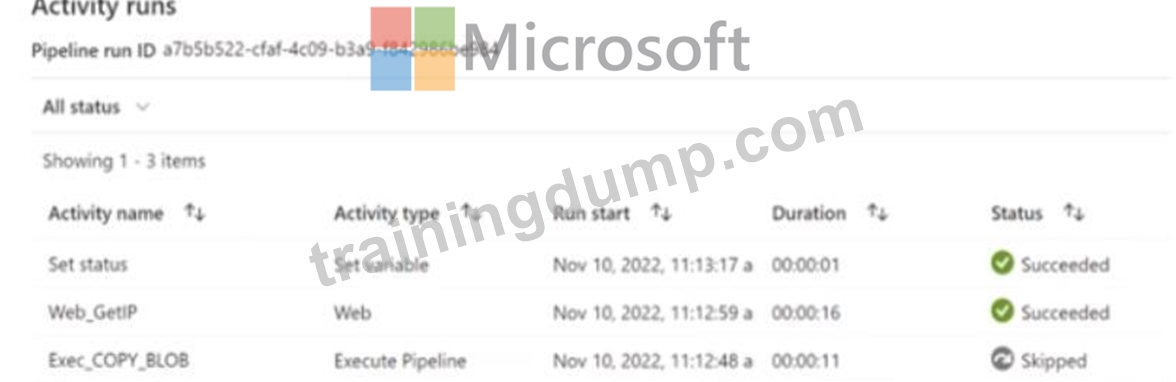
For each of the following statements, select Yes if the statement is true. Otherwise, select No. NOTE: Each correct selection is worth one point.
Answer:
Explanation:
Explanation
NEW QUESTION # 158
You use Azure Stream Analytics to receive data from Azure Event Hubs and to output the data to an Azure Blob Storage account. You need to output the count of records received from the last five minutes every minute. Which windowing function should you use?
- A. Hopping
- B. Sliding
- C. Session
- D. Tumbling
Answer: A
NEW QUESTION # 159
You are developing an Azure Synapse Analytics pipeline that will include a mapping data flow named Dataflow1. Dataflow1 will read customer data from an external source and use a Type 1 slowly changing dimension (SCO) when loading the data into a table named DimCustomer1 in an Azure Synapse Analytics dedicated SQL pool.
You need to ensure that Dataflow1 can perform the following tasks:
* Detect whether the data of a given customer has changed in the DimCustomer table.
* Perform an upsert to the DimCustomer table.
Which type of transformation should you use for each task? To answer, select the appropriate options in the answer area NOTE; Each correct selection is worth one point.
Answer:
Explanation:
Explanation: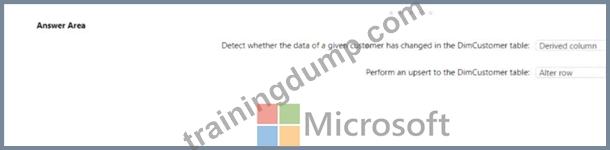
NEW QUESTION # 160
You have an enterprise-wide Azure Data Lake Storage Gen2 account. The data lake is accessible only through an Azure virtual network named VNET1.
You are building a SQL pool in Azure Synapse that will use data from the data lake.
Your company has a sales team. All the members of the sales team are in an Azure Active Directory group named Sales. POSIX controls are used to assign the Sales group access to the files in the data lake.
You plan to load data to the SQL pool every hour.
You need to ensure that the SQL pool can load the sales data from the data lake.
Which three actions should you perform? Each correct answer presents part of the solution.
NOTE: Each area selection is worth one point.
- A. Add the managed identity to the Sales group.
- B. Use the managed identity as the credentials for the data load process.
- C. Create a shared access signature (SAS).
- D. Add your Azure Active Directory (Azure AD) account to the Sales group.
- E. Use the snared access signature (SAS) as the credentials for the data load process.
- F. Create a managed identity.
Answer: A,D,F
Explanation:
The managed identity grants permissions to the dedicated SQL pools in the workspace.
Note: Managed identity for Azure resources is a feature of Azure Active Directory. The feature provides Azure services with an automatically managed identity in Azure AD Reference:
https://docs.microsoft.com/en-us/azure/synapse-analytics/security/synapse-workspace-managed-identity
NEW QUESTION # 161
You are building an Azure Stream Analytics job that queries reference data from a product catalog file. The file is updated daily.
The reference data input details for the file are shown in the Input exhibit. (Click the Input tab.)
The storage account container view is shown in the Refdata exhibit. (Click the Refdata tab.)
You need to configure the Stream Analytics job to pick up the new reference data.
What should you configure? To answer, select the appropriate options in the answer area.
NOTE: Each correct selection is worth one point.
Answer:
Explanation: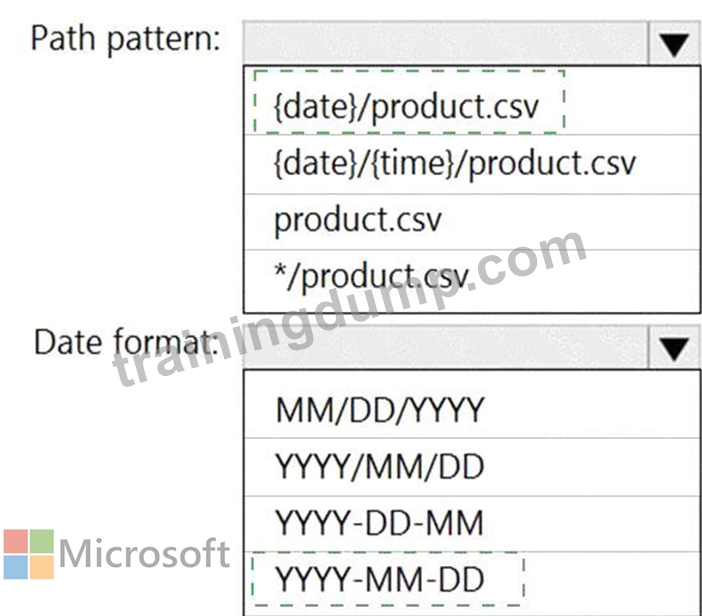
Explanation:
Box 1: {date}/product.csv
In the 2nd exhibit we see: Location: refdata / 2020-03-20
Note: Path Pattern: This is a required property that is used to locate your blobs within the specified container.
Within the path, you may choose to specify one or more instances of the following 2 variables:
{date}, {time}
Example 1: products/{date}/{time}/product-list.csv
Example 2: products/{date}/product-list.csv
Example 3: product-list.csv
Box 2: YYYY-MM-DD
Note: Date Format [optional]: If you have used {date} within the Path Pattern that you specified, then you can select the date format in which your blobs are organized from the drop-down of supported formats.
Example: YYYY/MM/DD, MM/DD/YYYY, etc.
Reference:
https://docs.microsoft.com/en-us/azure/stream-analytics/stream-analytics-use-reference-data
NEW QUESTION # 162
You have an Azure Synapse workspace named MyWorkspace that contains an Apache Spark database named mytestdb.
You run the following command in an Azure Synapse Analytics Spark pool in MyWorkspace.
CREATE TABLE mytestdb.myParquetTable(
EmployeeID int,
EmployeeName string,
EmployeeStartDate date)
USING Parquet
You then use Spark to insert a row into mytestdb.myParquetTable. The row contains the following data.
One minute later, you execute the following query from a serverless SQL pool in MyWorkspace.
SELECT EmployeeID
FROM mytestdb.dbo.myParquetTable
WHERE name = 'Alice';
What will be returned by the query?
- A. a null value
- B. 0
- C. an error
Answer: C
Explanation:
Explanation
Once a database has been created by a Spark job, you can create tables in it with Spark that use Parquet as the storage format. Table names will be converted to lower case and need to be queried using the lower case name.
These tables will immediately become available for querying by any of the Azure Synapse workspace Spark pools. They can also be used from any of the Spark jobs subject to permissions.
Note: For external tables, since they are synchronized to serverless SQL pool asynchronously, there will be a delay until they appear.
Reference:
https://docs.microsoft.com/en-us/azure/synapse-analytics/metadata/table
NEW QUESTION # 163
You have an Azure subscription that contains the following resources:
* An Azure Active Directory (Azure AD) tenant that contains a security group named Group1
* An Azure Synapse Analytics SQL pool named Pool1
You need to control the access of Group1 to specific columns and rows in a table in Pool1.
Which Transact-SQL commands should you use? To answer, select the appropriate options in the answer area.
Answer:
Explanation:
Explanation:
Text Description automatically generated
Box 1: GRANT
You can implement column-level security with the GRANT T-SQL statement.
Box 2: CREATE SECURITY POLICY
Implement Row Level Security by using the CREATE SECURITY POLICY Transact-SQL statement Reference:
https://docs.microsoft.com/en-us/azure/synapse-analytics/sql-data-warehouse/column-level-security
NEW QUESTION # 164
You have an Azure SQL database named Database1 and two Azure event hubs named HubA and HubB. The data consumed from each source is shown in the following table.
You need to implement Azure Stream Analytics to calculate the average fare per mile by driver.
How should you configure the Stream Analytics input for each source? To answer, select the appropriate options in the answer area.
NOTE: Each correct selection is worth one point.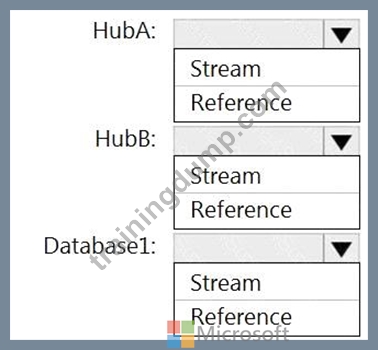
Answer:
Explanation:
Explanation
HubA: Stream
HubB: Stream
Database1: Reference
Reference data (also known as a lookup table) is a finite data set that is static or slowly changing in nature, used to perform a lookup or to augment your data streams. For example, in an IoT scenario, you could store metadata about sensors (which don't change often) in reference data and join it with real time IoT data streams. Azure Stream Analytics loads reference data in memory to achieve low latency stream processing Reference:
https://docs.microsoft.com/en-us/azure/stream-analytics/stream-analytics-use-reference-data
NEW QUESTION # 165
You have the following Azure Stream Analytics query.
For each of the following statements, select Yes if the statement is true. Otherwise, select No.
NOTE: Each correct selection is worth one point.
Answer:
Explanation:
Reference:
https://azure.microsoft.com/en-in/blog/maximize-throughput-with-repartitioning-in-azure-stream-analytics/
NEW QUESTION # 166
You need to build a solution to ensure that users can query specific files in an Azure Data Lake Storage Gen2 account from an Azure Synapse Analytics serverless SQL pool.
Which three actions should you perform in sequence? To answer, move the appropriate actions from the list of actions to the answer area and arrange them in the correct order.
NOTE: More than one order of answer choices is correct. You will receive credit for any of the correct orders you select.
Answer:
Explanation: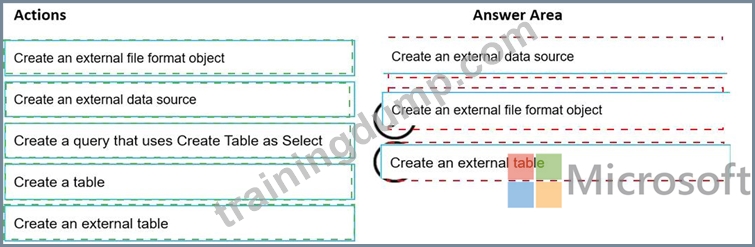
Explanation
Graphical user interface, text, application, email Description automatically generated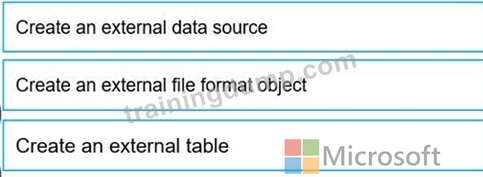
Step 1: Create an external data source
You can create external tables in Synapse SQL pools via the following steps:
* CREATE EXTERNAL DATA SOURCE to reference an external Azure storage and specify the credential that should be used to access the storage.
* CREATE EXTERNAL FILE FORMAT to describe format of CSV or Parquet files.
* CREATE EXTERNAL TABLE on top of the files placed on the data source with the same file format.
Step 2: Create an external file format object
Creating an external file format is a prerequisite for creating an external table.
Step 3: Create an external table
Reference:
https://docs.microsoft.com/en-us/azure/synapse-analytics/sql/develop-tables-external-tables
NEW QUESTION # 167
You have an Azure Synapse Analytics serverless SQL pool, an Azure Synapse Analytics dedicated SQL pool, an Apache Spark pool, and an Azure Data Lake Storage Gen2 account.
You need to create a table in a lake database. The table must be available to both the serverless SQL pool and the Spark pool.
Where should you create the table, and Which file format should you use for data in the table? TO answer, select the appropriate options in the answer are a.
NOTE: Each correct selection is worth one point.
Answer:
Explanation:
NEW QUESTION # 168
You are designing a slowly changing dimension (SCD) for supplier data in an Azure Synapse Analytics dedicated SQL pool.
You plan to keep a record of changes to the available fields.
The supplier data contains the following columns.
Which three additional columns should you add to the data to create a Type 2 SCD? Each correct answer presents part of the solution.
NOTE: Each correct selection is worth one point.
- A. last modified date
- B. effective end date
- C. business key
- D. effective start date
- E. foreign key
- F. surrogate primary key
Answer: B,C,D
Explanation:
Reference:
https://docs.microsoft.com/en-us/sql/integration-services/data-flow/transformations/slowly-changing-dimension-
NEW QUESTION # 169
You need to design an analytical storage solution for the transactional data. The solution must meet the sales transaction dataset requirements.
What should you include in the solution? To answer, select the appropriate options in the answer area.
NOTE: Each correct selection is worth one point.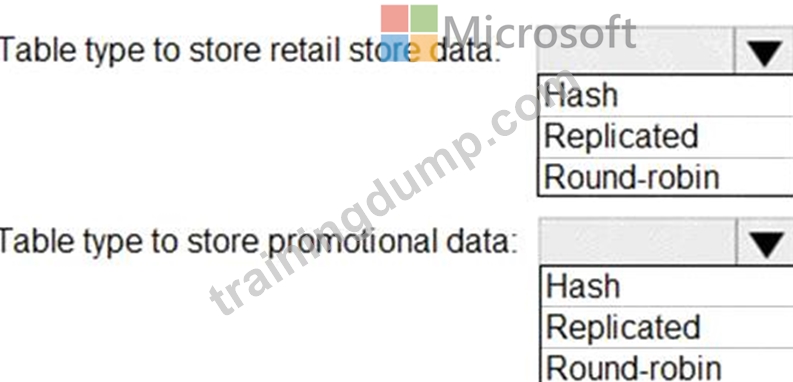
Answer:
Explanation:
Explanation
Graphical user interface, text, application, table Description automatically generated
Box 1: Round-robin
Round-robin tables are useful for improving loading speed.
Scenario: Partition data that contains sales transaction records. Partitions must be designed to provide efficient loads by month.
Box 2: Hash
Hash-distributed tables improve query performance on large fact tables.
Reference:
https://docs.microsoft.com/en-us/azure/synapse-analytics/sql-data-warehouse/sql-data-warehouse-tables-distribu
NEW QUESTION # 170
You have an Azure Synapse Analytics SQL pool named Pool1 on a logical Microsoft SQL server named Server1.
You need to implement Transparent Data Encryption (TDE) on Pool1 by using a custom key named key1.
Which five actions should you perform in sequence? To answer, move the appropriate actions from the list of actions to the answer area and arrange them in the correct order.
Answer:
Explanation:
1 - Assign a managed identity to Server1
2 - Create an Azure key vault and grant the managed identity permissions to the vault
3 - Add key1 to the Azure key vault
4 - Configure key1 as the TDE protector for Server1
5 - Enable TDE on Pool1
Reference:
https://docs.microsoft.com/en-us/azure/azure-sql/managed-instance/scripts/transparent-data-encryption-byok-powershell
NEW QUESTION # 171
......
Dumps for Free DP-203 Practice Exam Questions: https://www.trainingdump.com/Microsoft/DP-203-practice-exam-dumps.html
DP-203 Dumps PDF And Certification Training: https://drive.google.com/open?id=1t8urQYXBu54gf9h2DLZ8wT3LsDFQ4b37